Questions
How to make a yes/no form, and a true or false question
A yes/no form asks questions that have exactly two answers. This guide covers what a yes/no question is good for, how to build one in Forms, and how to write a true or false question, which uses the same question type.
What a yes/no form is for
A yes/no question is one of the closed-ended questions: the answers are fixed, and there are only two of them, with no middle. That makes it the right choice in three situations:
- A fact. Something the person can answer for certain, such as whether they're coming to an event.
- A screen. A question that decides who goes on, such as whether someone is eligible.
- A branch. A question whose answer decides what comes next, such as skipping the meal choice for people who can't come.
If you add "not sure", you no longer have a yes/no question: you have three options, and that's a multiple choice question. Keep yes/no for things that really have two answers.
A yes/no question is the wrong fit when the honest answer is "it depends" or "sometimes". "Do you enjoy your job?" has a range of answers, and forcing it into two loses that range. Ask how much instead, with an opinion scale or a rating. Yes/no also struggles when the question bundles two things: "Was the venue clean and easy to find?" can't be answered with one Yes if it was clean but hard to find. Split it into two questions, one fact each.
Three live Forms templates ask a yes/no question this way:
- The wedding RSVP template asks "Will you be joining us?"
- The employee pulse survey asks "Do you have what you need to do your best work?"
- The event feedback template asks "Will you join us next year?"
For more examples, and the trade-offs of two-answer questions, see our guide to dichotomous questions.
Build the form
In Forms the question type is called Yes/No. It's one of all 25 question types, and every type is on every plan, Free included. There's no yes/no template, so start from a blank form or from a template that already asks one.
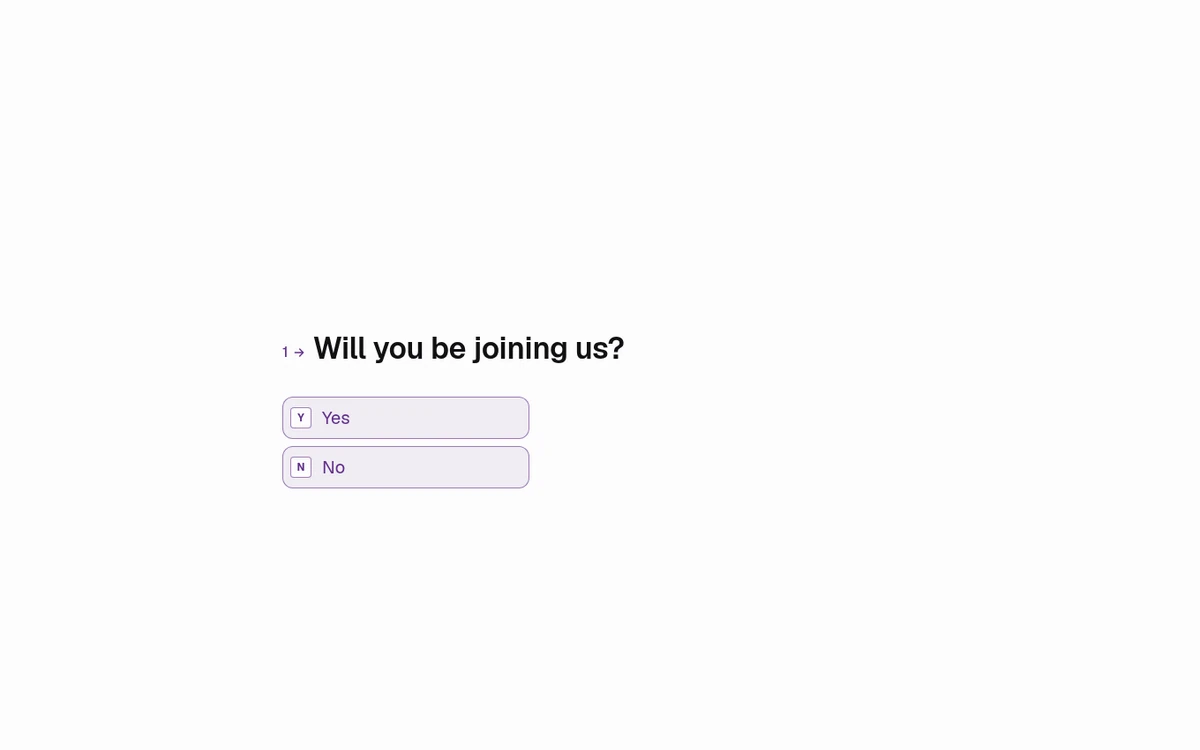
Five steps:
- Start a blank form, or start from the wedding RSVP template.
- Add a question and choose the Yes/No type.
- Write one fact per question, so that Yes and No each mean one thing.
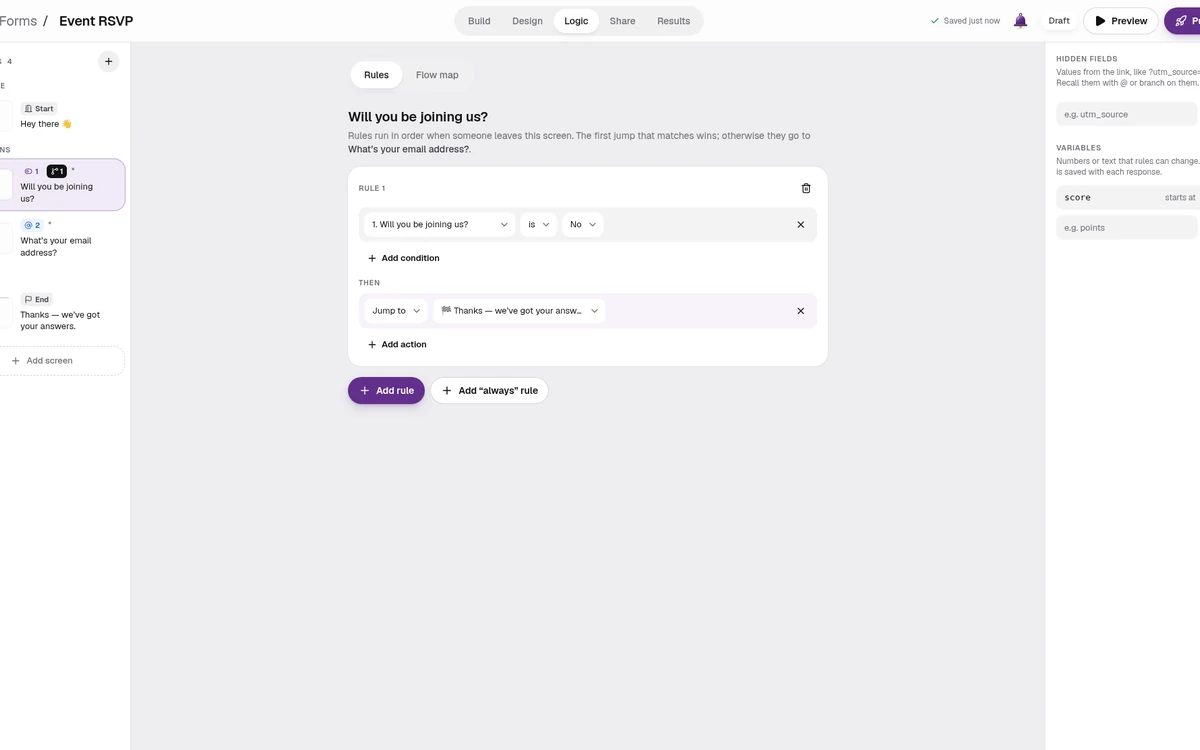
- If a No should end the form, open the Logic tab and add a rule that jumps to an ending when the answer is No.
- Publish the form and share one link.
The wedding RSVP template already works like step 4: people who can't come skip the meal and dietary questions and finish in one tap. With conditional logic, one rule can combine up to 30 conditions with "and" or "or", and logic is on every plan.
Respondents see one question at a time. They can tap an answer on a phone, or answer from the keyboard on a computer.
When responses come in, Results gives each question its own chart, so a Yes/No question shows how many people answered Yes and how many answered No. You can also export every response as CSV or JSON, or send each one to Google Sheets as it arrives.
How to write a true or false question
A true or false question uses the same Yes/No type. The statement is the question text, and Yes means true. There's no separate true/false type in Forms. The trivia quiz template asks one this way: its fourth question is "True or false: this opera house is in Sydney.", and its type is Yes / No.
The hard part is the statement. Developing Written Tests is a job aid by the BCIT Learning and Teaching Centre, first published in 1996 and revised in 2003, and hosted by Lane Community College. It ends its section on true/false questions with an 11-item checklist for writing them. Eight of the checklist's items, in our words:
- The statement is absolutely true or absolutely false.
- It's simple and easy to read.
- It tests only one idea.
- Avoid negatives unless they are very important.
- It's specific and direct, not implied.
- Each part of the statement is all true or all false.
- When it tests an opinion or a value, it names whose opinion it is.
- Across the test, the number of true and false statements is about the same.
We haven't added any of our own. The job aid also notes that the two choices may be Yes/No rather than True/False, which is how Forms asks them.
Four statements of our own, checked against that list:
- Good: "A week has seven days." The answer is Yes (true). One idea, plainly true.
- Good: "Sydney is the capital of Australia." The answer is No (false); the capital is Canberra. One idea, plainly false.
- Bad: "Paris is the capital of France and the Eiffel Tower is in Rome." It tests two ideas, and one part is true while the other is false. Split it into two statements.
- Bad: "It's not uncommon for meetings to run late." The double negative makes it harder to read, and "not uncommon" is neither clearly true nor clearly false. Ask something specific instead.
Scoring a true or false quiz
Quizzes are on every plan. Each answer can add or subtract points, and logic sends people to a different ending by their total or by their choice. Recall can put the score into the ending, so people see how they did.
There's no true/false quiz template. The three quiz templates are the trivia quiz, the personality quiz and the product recommendation quiz, all in the quiz and poll templates. For a true or false quiz, start from the trivia quiz template: it already keeps score and already asks one true or false question. Swap its questions for your statements, keep each one a Yes/No question, and give a point to the right answer for each.
Free gives you 3 active forms and 100 responses a month. Pro is $12/mo billed yearly. See Forms pricing, or types of questions in a questionnaire for the other formats.
Yes/no forms, answered
How do I make a yes/no form?
Add a question in Forms and choose the Yes/No type, then write one fact per question. Start from a blank form or the wedding RSVP template. If a No should end the form, add a rule in the Logic tab. Publish the form and share one link. Yes/No is on every plan, Free included.
Is a yes/no question the same as a true or false question?
In Forms, yes. A true or false question uses the Yes/No type: the statement is the question text, and Yes means true. There's no separate true/false type. The trivia quiz template asks one this way, with the statement "True or false: this opera house is in Sydney."
How do I write a good true or false question?
Make the statement clearly true or clearly false, keep it simple, and test only one idea. Avoid negatives unless they are very important, and make each part of the statement all true or all false. Those rules are from a written-test checklist by BCIT's Learning and Teaching Centre.
Can a yes/no form keep score?
Yes. Quizzes are on every plan, and each answer can add or subtract points. Logic then sends people to an ending by their total or by their choice, and recall can show the score. There's no true/false quiz template, so start from the trivia quiz template and change its questions.
Is a yes/no form free?
Yes. Yes/No is one of the 25 question types, and every type is on every plan, Free included. Free gives you 3 active forms and 100 responses a month, with logic and quizzes. Pro is $12/mo billed yearly and adds unlimited forms and responses.
See the trivia quiz template See Free vs Pro
New here? Start at Forms.